Previous Cali Post:
The Zhangs in Cali ep5. 落日飞车Main Plot Starts Here:
Don't run GIT commands unless you know what you're doing...
Don’t Trust GitHub Desktop … or Me
I tried to clone my new git repo to my desktop again, and the system said it was confused as the new repo name was the same as that of a project I deleted a few minutes ago. I deleted and recreated with the same repository name because I messed up some initialization config at first.
And my desktop icons started disappearing in chunks as I rapidly breathed in extreme fear.
A few seconds later. There was nothing left.
My 3 years of academic struggles, personal jargon, and music shits. Gone. All gone.
I don’t know what to say since my fingers were trembling with despair, and I know I should have learned OS better for this. What kind of cloud operation was it? Github? Or just me being too stupid to name 2 projects with the exact same name?
I instantly navigated to my iCloud desktop folder on my phone and sent the whole thing to Jiayi VIA IMESSAGE. 60GB of data via iMessage. That was an involuntary struggle. What was I, a dumbass?? I don’t have a hard drive with me, and why didn’t I listen to my dad when he said to keep a physical backup of my data? I mean I did but the fking drive is in China. God forbid this.
I was shaking as if I had just inhaled a can of coffee beans. I navigated to my settings to turn off the Document and Finder synchronization to prevent the deletion from spreading to all my cloud devices. Ok now it’s off, and I continued to shiver in utter silence at 4 am.
The birds were chirping. It was 5 am. The sky turned baby blue, and I was staring at my empty desktop. Yep, I know I should start downloading files from my cloud storage ASAP, but I was just so shocked and astonished by my stupidity. I was mortified.
Sort of did everything while shivering due to the lack of sleep. Later, I finally started restoring files in a UCLA classroom.
Jiayi and I were sitting in the back rows watching some people online shopping and others being studious. It was something like a literature + philosophy class, and the prof mentioned “Harry Potter’ at least 5 times. I like Harry Potter.
Error -8062
I will never forget this error after seeing it at least 20 times today. It often pops up when I try to copy-paste a big folder for the first time. But when I choose to “resume copying” afterwards for 2-3 rounds, the process works out fine.
“Error -8062 is a macOS file system error that typically happens with:
- iCloud sync conflicts
- File metadata issues
- Large folder operations
- Mixed file states (some downloaded, some not).”
—Claude Sonnet 4.0
My desktop folders are so dame big!
Select - right click - repeat… My fingers are definitely bulking after this.
I ended up zipping and unzipping big folders from the cloud to local. It was 20x faster. I was wondering why system designers don’t make the copy-paste process in the same logic as compressing and decompressing zip files. I looked it up, and it seems like the traditional copy-paste operation was preserved under a concern for old legacy machines - what if they don’t support zip files - and the differences between different OSes. Also, it looks like modern cloud operations are already following the trend of compressing data in the background.
Learn by doing!
I checked the git logs again too, and still don’t understand why my desktop got wiped away. But here is the log:
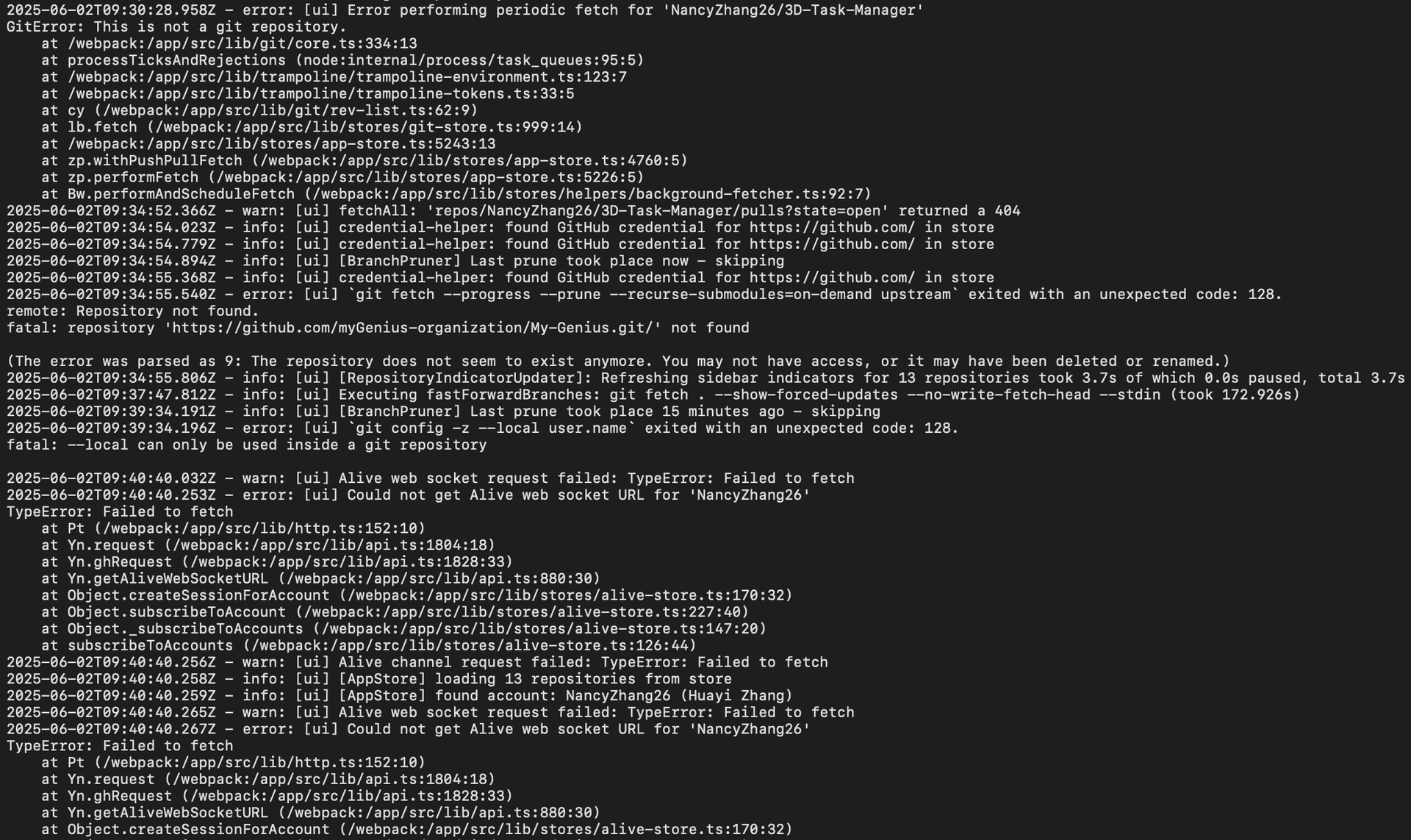
It was something between 9:35-40 Ig.
On my way to get some hard drives now. Debating whether I should turn on the files + finder sync again. Later!
Next Cali Post:
The Zhangs in Cali ep7. Random Thoughts.🫡🫡🫡
Since you've made it this far... Why not connect with me on LinkedIn?
Published